Master Class9 minSep 2026
A Free Master Class in How to Become a Local AI Expert in 2026
An overview of everything I actually use to run AI on my own machine in 2026 — the hardware, the open-source models and tools, and the videos and YouTubers that explain it all in detail. All of it free.

Note: This article is much bigger than it looks. What I mean by a free master class is an overview article written by myself (not an AI), and a whole bunch of relevant links, YouTube videos, and YouTubers explaining how it all works in detail. Just follow what interests you most and you’ll be good . . . Hey it’s free!
— Keep reading to see the Alice video generated with local LLM and Video Generator MiniMax H3 using ComfyUI at the end of my article.
Local AI in 2026
Alice may sound a little naive, but I’ve been writing articles about local AI since September 1, 2024. And before that as early as Dec 16, 2022, I was experimenting with cloud-based AI (AI inference from a datacenter) for my science fiction writings.
Today, I use Claude and ChatGPT as little as I can. Instead I rely on local open-source models from Hugging Face, and tools like ComfyUI for a majority of my creative content generation, research, articles, graphics, and some coding.
Admittedly I did use Claude Fable 5 for a really big coding project to simulate Alan Turing, because I needed HUGE compute for the task. However, once the framework was completed, I then used local AI to run it on my own local AI workstation.
Now this article updates all my previous posts to give you exactly what I am using today. I’m sure that will change tomorrow given how fast AI is evolving technically. So this article is not about whether AI is conscious yet, or ever will be, but more about the tools you can use today for free, if you have the right hardware.
That is still key, if you have an old machine with a weak GPU, then you’re still pretty much out of luck, and it’s way past upgrade time! Unfortunately memory prices are through the roof, compared to a couple of years ago because of the datacenter build-out which is sucking down all that available hardware.
You might be better off using cloud AI, but you will pay for it either way in hardware costs today, or subscription costs over time. I’m not a fortune teller, so I can’t tell you which would be better for you, or what’s going to happen to the AI bubble next year. That’s your call.
So if you are a go for local AI inference, let’s first break this down into hardware and software for your machine. I will be focusing on PCs — specifically those with NVIDIA GPUs — and not on Apple silicon. Many to most of the software will run on Apple machines (with Unified Memory) and comparable cards from AMD. But for those so inclined, this article is still partially for you; jump forward to the open-source software section next. I’m also not going to talk about which operating system to use, since it matters less and less as long as it can support the tools, and necessary graphics cards.
Hardware
16 GB of VRAM on an NVIDIA GPU is what I would still recommend minimum, even today. Yeah, you can do some things with 8 GB VRAM, but it’s limited and you will be wanting more. If you have more than 16, great! However, 12GB is still doable, but your model selections will need to be even more optimized, and you will have less room for working context inside of VRAM (causing it to spill over into CPU ram and potentially slowing down token rates).
Hint: there are still very affordable sub $700 used GPUs for sale on eBay and such. But please check out the hardware condition and seller reviews. There are some refurbished models on Amazon too. The very minimum seems to be the RTX 4060 Ti, which I have. If you can do a 5060 Ti, then better I think. Just make sure the card has 16 GB VRAM — or you will regret it; some cards were made with 8 GB VRAM, be aware of that!
Finally, it needs to be stated for the newbies, if you have only experienced cloud based AIs then you may be accustomed to faster response times. Depending on your local AI hardware, don’t expect to get fast responses. So instead don’t work fast, work smart. Datacenters are optimized with many GPUs working together on your prompts.
Some local AI experts have built custom systems with multiple GPU cards, but these are really orders of magnitude more expensive. It also requires skills and experience with computer system hardware building.
Software
Now we are talking about open-source exclusively, no paid subscriptions. The place you will mostly find these is again on Hugging Face. As for tools, we will separate those into two subcategories: LLMs, and image, video and audio generation AI. Now I know some LLM AI models have image capabilities baked in. But here we go . . .
LLMs
There are really three “brands” that I run today on my system in the order I run them (Qwen 3.8 27B, Gemma 4, Muse-Glimmer). But first let’s talk about the tools to run them, because there are many different ways, but I prefer the easier ones with a GUI such a LM Studio, and Unsloth Desktop.
Image, Video and Audio Generation AI
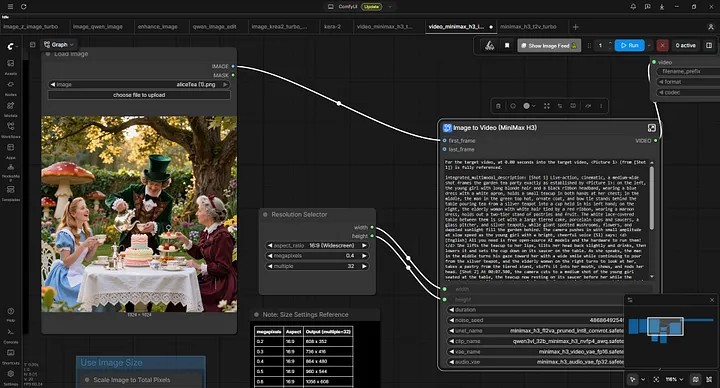
For this ComfyUI is the clear leader, I prefer the desktop version, and will require an understanding of nodes, and workflows for generation processes. Here, is where Apple users may find it difficult running these workflows with models trained to use CUDA (NVIDIA GPUs). I have heard of Apple owners using NVIDIA GPU cards. I don’t own stock in NVIDIA, it’s just the way things are in 2026. That will most likely change, probably next year or so.
Now the best way to proceed is to provide links to the tools and YouTube videos for explanations and set up. Also at the end I will provide links to some of the YouTubers who are explaining things best.
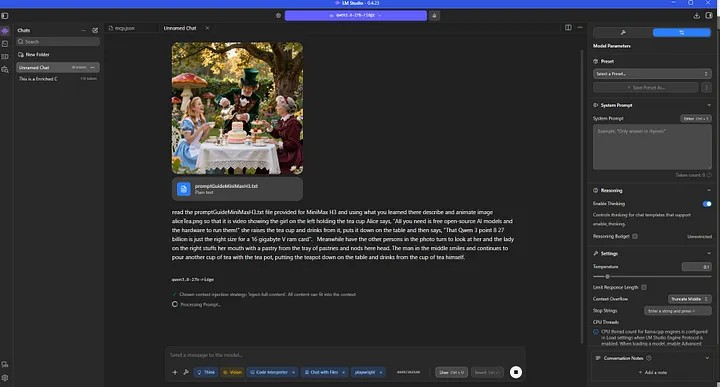
Finally, here is a video clip completely generated with local AI . . . on my machine no less. Here is the PROMPT: For the target video, at 0.00 seconds into the target video, <Picture 1> (from [Shot 1]) is fully referenced.
integrated_multimodal_description: [Shot 1] Live-action, cinematic, a medium-wide shot frames the garden tea party exactly as established by <Picture 1>: on the left, the young girl with long blonde hair and a black ribbon headband, wearing a blue dress with a white apron, holds a small teacup in both hands at her chest; in the middle, the man in the green top hat, ornate coat, and bow tie stands behind the table pouring tea from a silver teapot into a cup held in his left hand; on the right, the elderly woman with white hair tied by a red ribbon, wearing a maroon dress, holds out a two-tier stand of pastries and fruit. The white lace-covered table between them is set with a large tiered cake, porcelain cups and saucers, a glass pitcher, and silver teapots, while giant spotted mushrooms, flowers, and dappled sunlight fill the garden behind. The camera pushes in with small amplitude at slow speed as the young girl with a bright, cheerful voice (S1) says: <d>[English] All you need is free open-source AI models and the hardware to run them!</d> She lifts the teacup to her lips, tilts her head back slightly and drinks, then lowers it and sets the cup down on its saucer on the table. As she speaks, the man in the middle turns his gaze toward her with a wide smile while continuing to pour from the silver teapot, and the elderly woman on the right turns to look at her, takes a pastry from the tiered stand, stuffs it into her mouth, chews, and nods her head. [Shot 2] At 00:07.500, the camera cuts to a medium shot of the young girl seated at the table, the teacup now resting on its saucer before her while the tiered cake and silver teapot remain in soft focus behind; the camera holds a static shot as she says: <d>[English] That Qwen 3 point 8 27 billion is just the right size for a 16 gigabyte V ram card</d> The man behind her finishes pouring, sets the silver teapot down on the table with a soft clink, and drinks from his own cup. The elderly woman beside her chews the pastry and nods again toward the young girl.
overall_soundscape: Garden ambience with birdsong and a light breeze rustling the leaves fills the background throughout. Porcelain clinks softly as cups are lifted, poured into, and set down on saucers, while a faint trickle of liquid accompanies the pour from the silver teapot. The pastry crunches lightly in the woman’s mouth as she leans forward in her chair.
non_diegetic_music: An orchestral score led by pizzicato strings and a flute melody at a moderate waltz tempo, joined by soft harp arpeggios that gradually increase in volume toward the end of the scene.
Here is the resulting video clip, cool huh?
If you enjoyed this article, please click me up and follow me here on Medium, and visit my websites. Now to everything and everyone I relied on to get here, let the master class begin!
Happy Local AI-ing!
LLMs
- unsloth/Qwen3.8-27B-GGUF · Hugging Face — We’re on a journey to advance and democratize artificial intelligence through open source and open science. — huggingface.co
- empero-ai/Qwen3.8-27B-Ridge-GGUF · Hugging Face — We’re on a journey to advance and democratize artificial intelligence through open source and open science. — huggingface.co
- Gemma 4 — How to Run Locally | Unsloth Documentation — Run Google’s new Gemma 4 models locally, including E2B, E4B, 26B A4B, and 31B. — unsloth.ai
- unsloth/Muse-Glimmer-30B-GGUF · Hugging Face — We’re on a journey to advance and democratize artificial intelligence through open source and open science. — huggingface.co
Tools
- Hermes Agent — The Agent That Grows With You — Hermes Agent is the open-source, self-hosted AI agent by Nous Research. Persistent memory, self-created skills, and a… — hermes-agent.nousresearch.com
Models
Image, Video and Audio Generation
Tools
Models
- ComfyUI — ComfyUI is the most powerful open-source, node-based platform for generative AI. Build custom workflows to create… — www.youtube.com
AI Popular YouTubers
- Digital Spaceport — Homelab, Local AI Home Servers, and a Home Datacenter in my garage. Builds, setup guides, running and testing AI…
- Fahd Mirza — Fahd Mirza, writing the story of AI hands-on as it unfolds — daily. Based in Sydney, Australia. Covering every AI…
- AI Search — Making AI easy to understand for everyone. Subscribe to stay on top of the latest AI news, trends, and tools! For all…
- Gary Explains — Gary Explains breaks down complex technology and computing concepts into clear, in-depth explainer videos. Host Gary…
- Matthew Berman — My mission is simple: to make the benefits of AI and emerging technology accessible to everyone, everywhere. I believe…
- David Ondrej — “The greatest danger is not that our aim is too high and we miss it, but that it is too low and we reach it.”…
- Aitrepreneur — Welcome to Aitrepreneur, I make content about AI (Artificial Intelligence), Machine Learning and new technology. Thank…
- Level1Techs — We are passionate about technology and how it shapes our world. We create videos to share our knowledge about tech…
- Bijan Bowen — www.bijanbowen.com
- kintu — Share your videos with friends, family, and the world
- Alex Ziskind — Cracking code and curiosities, I turn caffeine-fueled late nights into bytes of wisdom. Welcome aboard! I’m Alex, with…
- AI News & Strategy Daily | Nate B Jones — Feeling overwhelmed by AI hype? I’m here to help. I’m Nate B. Jones. 20-year product leader, AI strategist, and your…
- NetworkChuck — Welcome to NetworkChuck! I LOVE Information Technology!! My goal is to help as MANY PEOPLE AS POSSIBLE jump into a…
- Gamers Nexus — PC hardware reviews, game benchmarks, component analysis. Please subscribe for updates!
◇ Michael McAnally
Continue the thread